Login
Login
 Cart
Cart
What is a SKU? It is the short, internal code you assign to one specific, sellable version of a product – one size, one colour, one pack quantity. A black hoodie is a product; the same hoodie in size large is a stock-keeping unit. The SKU is what lets your store, your warehouse and your sales reports tell the two apart.
Most guides answer this question for one platform only. This one covers both. You will get the SKU meaning, what SKU stands for, real SKU examples by industry, a naming system you can copy, and step-by-step setup instructions for WooCommerce and Shopify.
Table of contents
- What Is a SKU? (Meaning and Definition)
- The Anatomy of a SKU
- What Does SKU Stand For?
- What Is a Stock Keeping Unit?
- Why SKUs Matter for WooCommerce and Shopify Stores
- How Many SKUs Should a Store Have?
- SKU Examples by Industry
- How to Create a SKU Naming System
- How to Add and Manage SKUs in WooCommerce
- How to Add and Manage SKUs in Shopify
- SKU vs UPC vs Barcode vs GTIN vs Serial Number
- Best Practices and Common SKU Mistakes
- FAQ
- Conclusion
What Is a SKU? (Meaning and Definition)
A SKU is a unique code you create to identify one exact product variant in your own catalogue. It is internal. You invent it, you control the format, and nobody outside your business needs to recognise it. The SKU meaning becomes obvious the moment you sell variations. “Cotton T-Shirt” is a product. “Cotton T-Shirt, navy, size M” is a stock keeping unit. Only the second one can be counted, picked from a shelf and reordered.
SKU stands for Stock Keeping Unit. It is usually said out loud as “skew”, one syllable, though plenty of people spell out S-K-U. The phrase comes from retail and warehouse inventory practice, where each distinct item held in stock needed its own line in the stock ledger. Online stores inherited the term along with the discipline behind it. You will also see SKU used as a loose synonym for “product variant” in conversation , “we carry 400 SKUs” means 400 distinct sellable items, not 400 product pages.
That is the whole job of a SKU: it turns a loose product listing into a countable thing. Every stock number, sales report and purchase order in your store hangs off it.
The Anatomy of a SKU
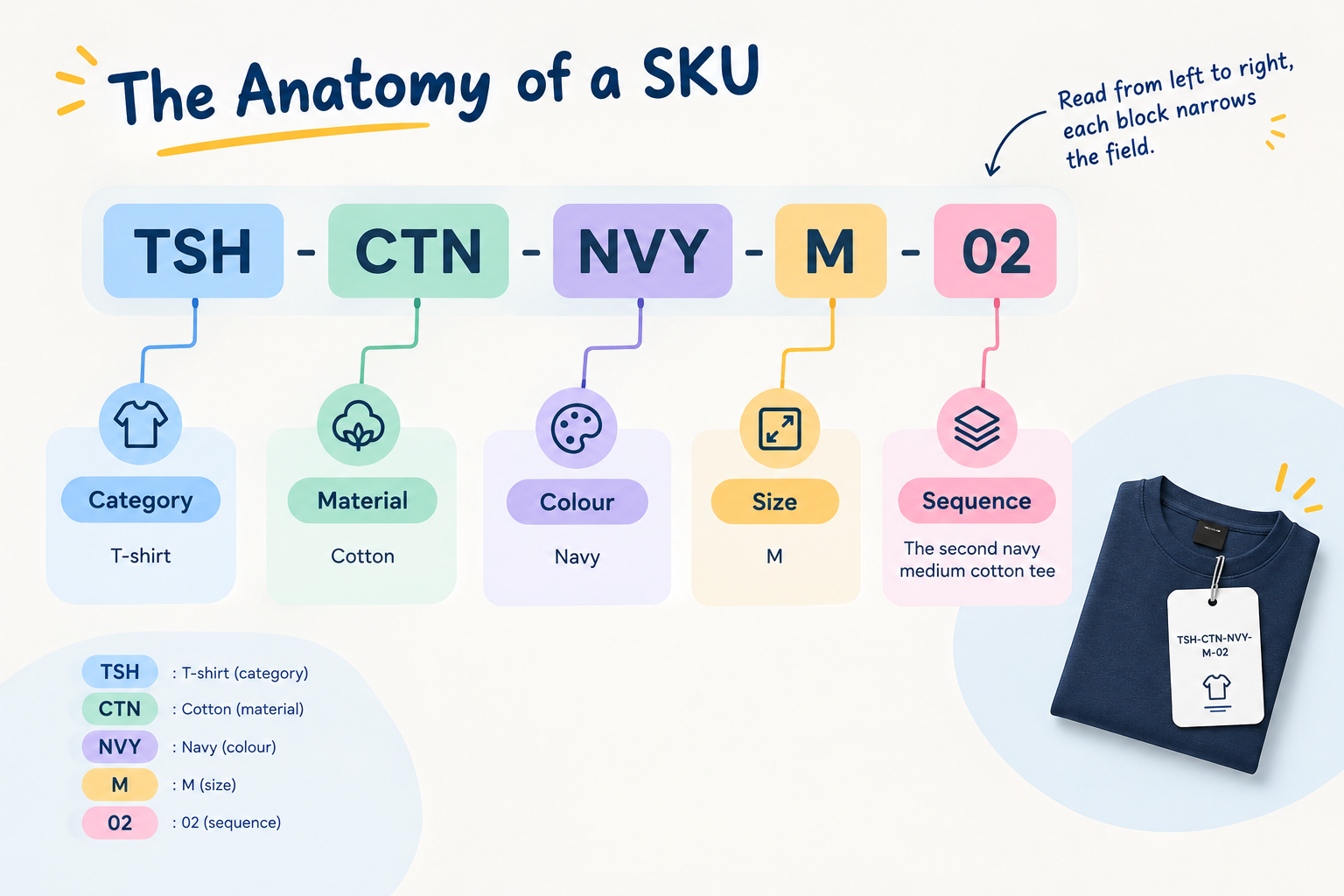
Nothing in that string is decorative. Strip any segment and you lose the ability to tell two sellable items apart.Every segment in the code has a single job, and together they form a decision tree that moves from the product family to the exact item.
Category (TSH) – This is the product family. It groups every t-shirt together in your inventory list so a picker, a spreadsheet sort, or a scanner sees the full family before drilling down. Without this first block, a navy hoodie and a navy t-shirt could sit next to each other and slow fulfilment.
Material (CTN) – This splits the family into fabric or build types. Cotton, polyester, and linen each carry their own abbreviation, keeping the structure parallel. When a new material variant arrives later, you only swap this segment instead of redesigning the whole code.
Colour (NVY) and size (M) – These are the attributes that change most often and matter most on the warehouse floor. They sit in the middle of the code because they are the details a picker checks after locating the product family and material. Once this segment is reached, there is only one physical item left to grab.
Sequence (02) – A short numeric tail that prevents collisions when two nearly identical items share every other attribute. Two navy medium cotton t-shirts from different suppliers, or two seasonal releases of the same design, stay separate because of this tail.
The left-to-right flow from broad to specific is deliberate. A warehouse worker reading TSH-CTN-NVY-M-02 processes it as t-shirt first, cotton second, then colour, then size, then the unique tail – the same mental path used when walking a stock aisle: section, shelf, colour, size, exact item. That shared logic between the code and the physical layout is what makes a well-built SKU fast to learn and hard to misread. Sorted lists and CSV exports stay grouped by family, then by material, then by variant, so stock numbers never fragment across random prefixes.
What Is a Stock Keeping Unit?
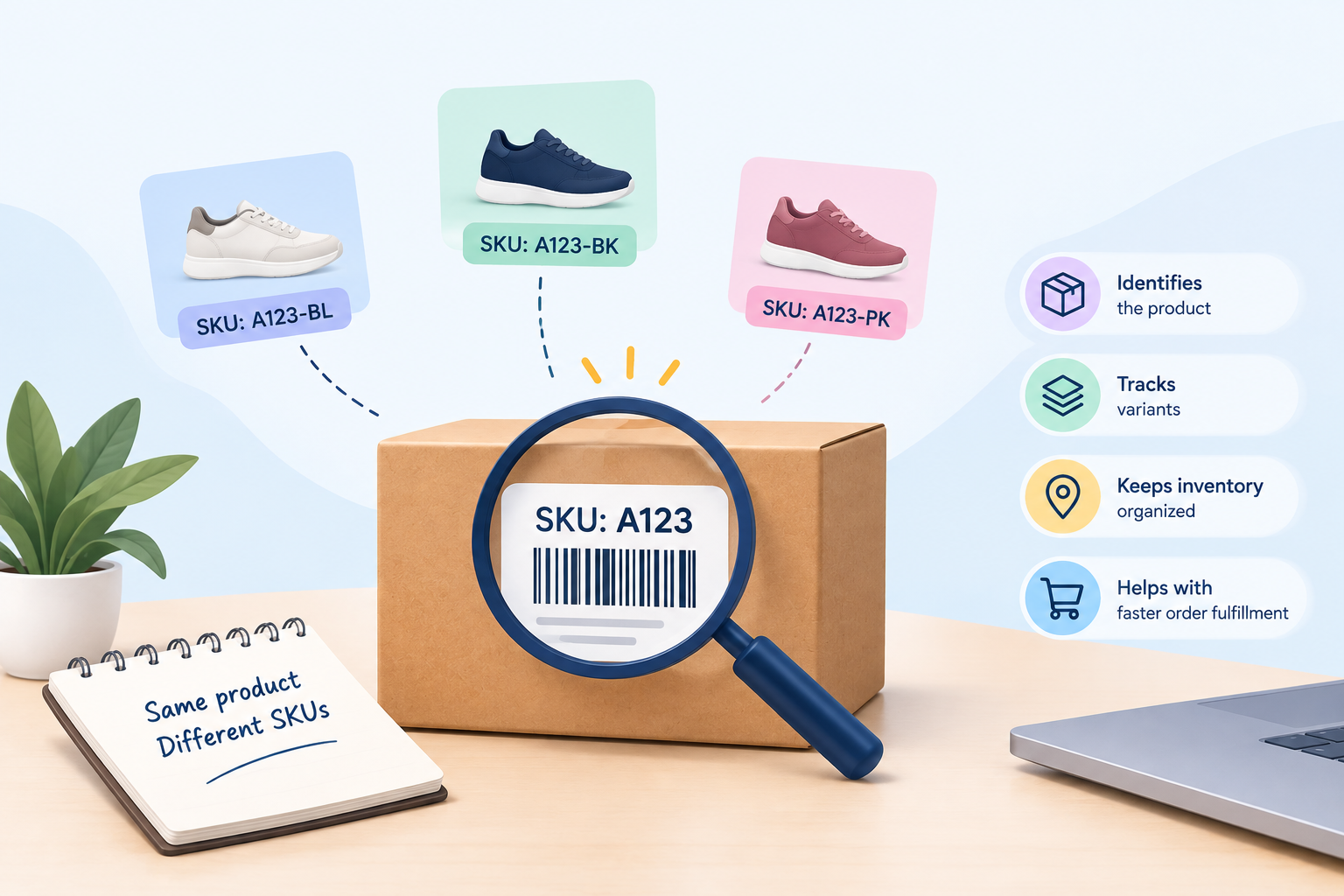
A stock keeping unit is the smallest unit of inventory you track and sell separately. If two items can sell out independently of each other, they are two stock keeping units.
That test is more useful than any definition. A 250 ml bottle and a 500 ml bottle of the same sauce are two stock keeping units. A T-shirt in three colours and four sizes is twelve.
The distinction matters for bundles too. A gift box containing three products is its own stock keeping unit, even though its contents have their own codes. If you sell bundles, tools like bundled products need each component to carry a clean SKU so stock is deducted correctly.
Why SKUs Matter for WooCommerce and Shopify Stores
Accurate stock counts. Without a variant-level code, you are guessing which colour actually sold. With one, your stock number tells the truth per variant.
Faster fulfillment. A picker reading TSH-NVY-M-002 off a slip does not need to interpret a product title. Errors drop, especially with similar-looking items.
Reporting that means something. Sales by SKU tells you which variant earns and which one sits. On Shopify, a reporting app such as Elegant Reports can break revenue down to that level; in WooCommerce, the same data sits behind your order records.
Reorder points. You cannot set a reorder trigger on “hoodie”. You can set one on the exact size that keeps running out.
Pricing and promotions. Rules that discount one variant and not another rely on a stable identifier. That is how dynamic pricing and discount rules target a specific pack size or colour instead of a whole product.
Customer support. When a shopper writes in, one code resolves what “the blue one, the bigger size” would take three emails to establish.
How Many SKUs Should a Store Have?
As many as it has genuinely distinct sellable items – and no more. The count is a consequence of your catalogue, not a target.
Work it out from variants, not products. A t-shirt in three colours and four sizes is twelve SKUs, and every combination that can sell out on its own needs one: add a new size and the count grows by three, add a colour and it grows by four. Each SKU is a stock line, a reorder point and a row in your reports, so every code should earn its place.
Both directions of error are costly. Too few SKUs means you cannot tell which variant actually sold – “navy medium” and “navy large” collapse into one row and reordering becomes guesswork. Too many usually comes from duplication: the same item entered twice under slightly different codes after a supplier change, or a colour split into “charcoal” and “dark grey” that nobody in the warehouse can distinguish. Both inflate the count and corrupt the stock data.
A yearly review that merges near-identical variants and retires dead ones keeps the list honest – and as long as retired codes are never reused, the historical data stays trustworthy too.
SKU Examples by Industry

A good SKU example reads left to right from broad to specific. Here are four patterns that work in practice.
Apparel
| SKU example | Meaning |
| TSH-CTN-NVY-M | T-shirt, cotton, navy, medium |
| TSH-CTN-NVY-L | Same shirt, large |
| HOD-FLC-BLK-XL | Hoodie, fleece, black, XL |
Electronics
| SKU example | Meaning |
| HPH-OE-BLK-BT | Headphones, over-ear, black, Bluetooth |
| CBL-USBC-2M-WHT | USB-C cable, 2 metres, white |
Food and beverage
| SKU example | Meaning |
| SAU-CHL-250 | Chilli sauce, 250 ml |
| SAU-CHL-500 | Chilli sauce, 500 ml |
| COF-ARB-GRD-1KG | Coffee, arabica, ground, 1 kg |
Home and furniture
| SKU example | Meaning |
| CHR-DIN-OAK-2PK | Dining chair, oak, two-pack |
| RUG-WOL-160240-GRY | Wool rug, 160×240 cm, grey |
Notice what none of them contain: spaces, slashes, accented characters, or the year you launched the product. Every segment describes something that will never change about the item.
How to Create a SKU Naming System
Use a fixed template and apply it to everything. A dependable one is:
CATEGORY-STYLE-COLOUR-SIZE-SEQUENCE
Work through it in four steps.
1. Fix your segment order. Broadest first. Category, then style or material, then the attributes that vary. Keep the same order for every product so a code can be read at a glance.
2. Choose short, stable abbreviations. Two to four characters per segment. Write them in a shared document – NVY for navy today must not become NAV next season.
3. Cap the length. Shopify’s own guidance recommends keeping SKUs short and advises avoiding characters that are easy to confuse, such as the letter O against zero and the letter I against one. Shopify’s SKU documentation sets out these conventions in full.
4. Add a sequence only where you need it. A two or three-digit tail handles near-identical items – two grey hoodies from different suppliers, say – without inventing new attribute codes.
Two rules protect the system over time. Never encode price, because price changes. Never reuse a retired code, because your historical reports will silently merge two different products.
If your catalogue is variation-heavy, sort the attribute structure before you generate codes. Variant presentation and variant data go together: variation swatches let shoppers pick a colour visually, while the SKU behind each swatch is what your warehouse acts on.
How to Add and Manage SKUs in WooCommerce
WooCommerce stores the SKU on the product’s Inventory tab. For a simple product:
- Open Products → All Products and edit the product.
- Scroll to the Product data panel.
- Click the Inventory tab.
- Enter your code in the SKU field.
- Update the product.
For a variable product, each variation gets its own field:
- In Product data, set the product type to Variable product.
- Add your attributes and tick Used for variations.
- Open the Variations tab and expand a variation.
- Enter the SKU for that exact variation.
- Repeat for every variation, then save changes.
One detail catches people out. If you leave a variation’s SKU blank, WooCommerce falls back to the parent product’s SKU for that variation which is the usual cause of “duplicate SKU” confusion in reports. The variable product documentation covers the field and its behaviour, and the managing products guide explains how product types differ.
WooCommerce also keeps identifiers like GTIN, UPC, EAN and ISBN in a separate field. Put manufacturer numbers there, not in the SKU field.
For bulk work, editing SKUs one product at a time is slow. A front-end product table makes it easy to display and audit SKUs across a large catalogue, and a spreadsheet import remains the fastest way to apply a new naming system to hundreds of variants at once.
How to Add and Manage SKUs in Shopify
Shopify keeps the SKU in the variant record:
- From your admin, open Products and select the product.
- Scroll to the Inventory section for a single-variant product, or to Variants if the product has options.
- Enter your code in the SKU (Stock Keeping Unit) field.
- Save.
To edit many at once, select the products on the Products list and use the bulk editor, adding the SKU column.
Two Shopify specifics are worth knowing. First, the SKU field and the barcode field are separate: barcode scanners read the barcode field, not the SKU. Second, Shopify’s fulfilment network requires a unique SKU on every variant, so duplicates will block you well before your reporting does. Both points are documented on Shopify’s SKU page.
SKU vs UPC vs Barcode vs GTIN vs Serial Number

These five terms get used interchangeably, and they are not the same thing.
| Identifier | Who assigns it | Scope | Identifies | Typical use |
| SKU | You | Internal to your business | One product variant | Inventory, picking, reporting, pricing rules |
| GTIN | GS1 | Global, standardised | A product as sold by its manufacturer | Marketplaces, retail data feeds |
| UPC | GS1 | Global (12-digit, mainly North America) | A manufacturer’s product | Retail checkout, distribution |
| Barcode | Whoever prints it | Depends on the number encoded | Nothing on its own | A scannable representation of a number |
| Serial number | Manufacturer | One physical unit | A single item, not a variant | Warranty, service history, theft recovery |
Three clarifications settle most of the confusion:
- A barcode is not an identifier. It is a way of printing one so a scanner can read it. The number inside might be a GTIN, or it might be your own SKU.
- UPC is one member of the GTIN family. GS1 is the only body that issues genuine GTINs and UPCs – you can see the process on GS1’s barcode page.
- Serial numbers go one level deeper than SKUs. A hundred identical laptops share one SKU and carry a hundred different serial numbers.
The practical rule: your SKU is yours, and your GTIN is the manufacturer’s. Keep both, in different fields.
Best Practices and Common SKU Mistakes
Do this
- Start every code with a letter, not a zero, so spreadsheets stop stripping it.
- Use only uppercase letters, digits and hyphens.
- Keep codes short enough to read aloud without losing your place.
- Document the scheme where your whole team can find it.
- Assign the SKU before the product goes live, not after the first order.
Avoid this
- Reusing a retired code. Old orders and new orders merge in your reports, and the damage is invisible.
- Encoding price or launch year. Both change; the code should not.
- Copying the manufacturer’s part number as your SKU. It changes when they revise the product, and it tells your competitors what you stock.
- Leaving variation SKUs blank. In WooCommerce the parent code fills the gap and your variant-level data quietly stops being variant-level.
- Mixing formats across catalogue sections. One scheme, one order of segments, no exceptions.
- Using spaces, slashes or symbols. They break CSV exports, URLs and some integrations.
- Skipping a stock take after a renaming project. Renaming touches every downstream system, so verify counts once the new codes are in.
SKUs also flow into paperwork. Packing slips and invoices are far easier to check against a picked box when the variant code is printed on them, which is why documents generated with a tool like PDF invoices and packing slips should include the SKU column.
Getting Started
If you are setting up a store from scratch, assign codes while you build the catalogue – retrofitting them across hundreds of live products is considerably more work. Our WooCommerce setup guide walks through the product configuration steps where the SKU field appears.
If your catalogue already exists and the codes are inconsistent, export everything to a spreadsheet, design the scheme once, apply it in bulk, then re-import and run a stock take. It is a one-day job that pays for itself the first time you need to know exactly which variant sold out.
Conclusion
A SKU – a stock keeping unit – is the smallest piece of your catalogue that you sell, count and reorder on its own: not the hoodie, but the hoodie in navy in size large. Get the codes right and stock counts tell the truth per variant, pickers work faster, reports separate winners from shelf-warmers, and pricing rules can target one size without touching the rest.
The system behind a good code is simple and stable. Fix a broad-to-specific template such as CATEGORY-STYLE-COLOUR-SIZE-SEQUENCE, keep segments short with a shared abbreviation list, and never encode anything that can change. In WooCommerce, the SKU lives on the Inventory tab; in Shopify, it lives on the variant record. Keep it separate from manufacturer identifiers like GTIN and UPC, which belong in their own fields.
None of this requires exotic tooling – a spreadsheet, a documented scheme and a stock take are enough. Do it once, do it consistently, and it will pay for itself the first time you need to answer a simple question: which variant sold out, and how many of it should you order?
Acowebs are the developers of the WooCommerce PDF Invoices and Packing Slips which generate PDF invoices automatically and add them to the confirmation emails sent to your customers.WooCommerce invoice plugin allow you Create, edit, and modify your own templates and to download or print invoices and packing slips from the woocommerce email customizer using which you can easily build and customize WooCommerce emails with a drag-and-drop user interface.
FAQ
SKU stands for Stock Keeping Unit. It is an internal code that identifies one exact product variant in your catalogue, and it is usually pronounced “skew”.
There is no difference – SKU is simply the abbreviation of stock keeping unit. In everyday use, “SKU” tends to mean the code itself, while “stock keeping unit” tends to mean the item that code refers to.
No. A SKU should be unique to one variant, because duplicates make stock counts and sales reports unreliable. In WooCommerce, duplicates commonly appear by accident when a variation’s SKU field is left blank and inherits the parent product’s code; Shopify’s fulfilment network rejects duplicate variant SKUs outright.
No. A SKU is a number you assign for internal use, while a barcode is a scannable printed representation of some number. That number is often a GTIN or UPC issued by GS1, though you can also print your own SKU as a barcode for warehouse use.
In WooCommerce, edit the product and open the Inventory tab in the Product data panel; for variable products, expand the variation under the Variations tab. In Shopify, open the product and look at the Inventory section, or at the variant row if the product has options. Both platforms also expose the field in their bulk-edit and CSV export tools.
Yes. Even when your supplier holds the stock, a SKU lets you see which variant sold and match orders to supplier records. Some Shopify locations and import apps also refuse to save a variant with a blank SKU. Use your own consistent codes rather than random numbers.
A SKU is the code you assign to your own offer. An ASIN is Amazon’s catalogue ID for the product page. An FNSKU is the Amazon barcode label used for FBA inventory, and it is tied to your seller account. Use the same SKU on your store and on Amazon so stock stays in sync.