
Knowledge Base

Hi, How can we help?

How do I synchronize renewal dates to a specific day of the week, month, or year?

The Billing Synchronization option allows you to align subscription renewal dates to a specific day. The available synchronization options depend on the selected Billing Period.
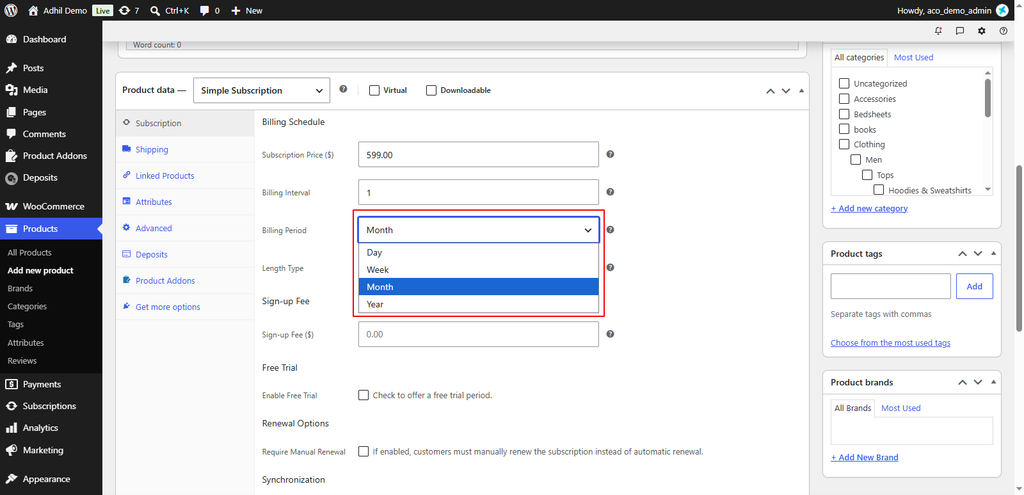
Configure Billing Synchronization

  1. Go to Products → Add New Product or open an existing subscription product.
  2. Scroll down to the Product Data section and select Simple Subscription as the product type.
  3. Open the Subscription tab.
  4. Under Billing Schedule, select the required Billing Period:
    • Day — The subscription is billed daily.
    • Week — The subscription is billed weekly.
    • Month — The subscription is billed monthly.
    • Year —The subscription is billed yearly.

5. Enable Billing Synchronization and select the required synchronization day .
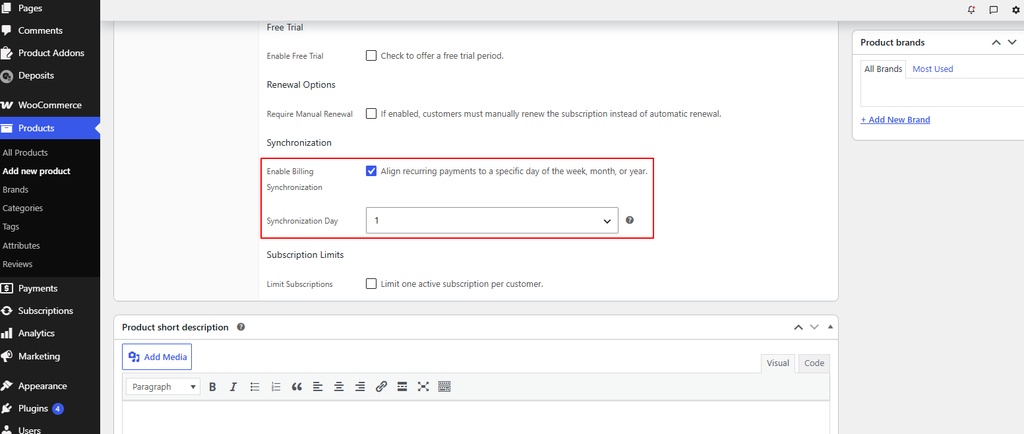
6. Finally, click Publish or Update to save the changes, then verify on the storefront that the subscription and renewal settings are working as expected.

Customer Support

If you have questions about our plugin(s), are experiencing issues with any of our plugin




















