
You can offer customers a free trial period and charge a one-time sign-up fee when they subscribe to a product.
1.Go to Products → Add New Product or open an existing subscription product.
2. Scroll down to the Product Data section.
3. Select Simple Subscription as the product type and open the Subscription tab
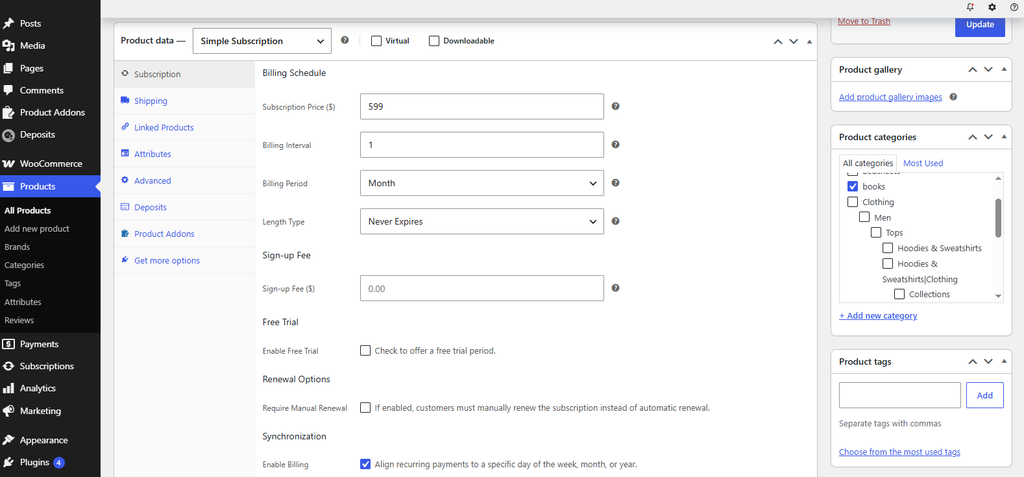
4. Configure the following options:
Sign-up Fee — Enter the one-time fee you want to charge the customer when they subscribe.
Example: Enter 10.00 to charge a $10 sign-up fee.
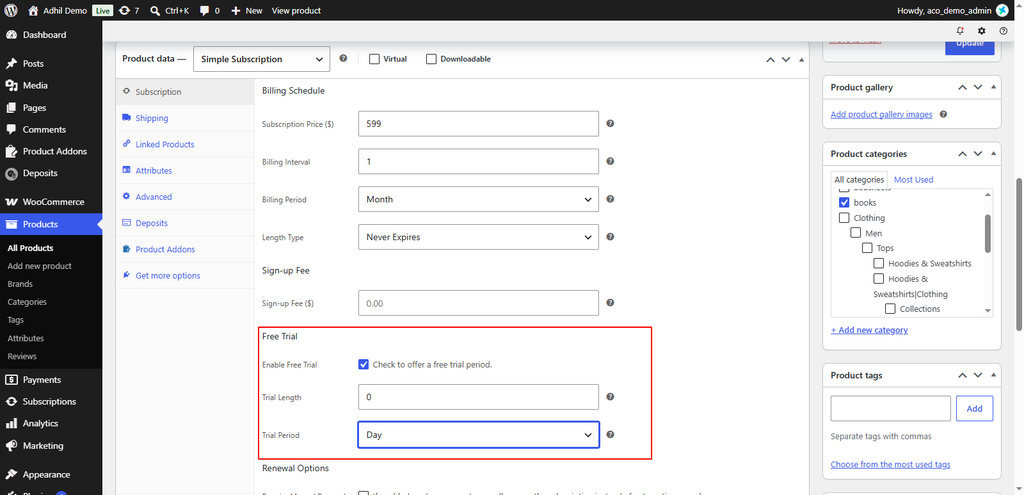
Free Trial — Enable this option to offer customers a free trial before the recurring subscription payments begin.
Trial Length — Enter the duration of the free trial.
Trial Period — Select the time unit for the trial duration, such as Day, Week, Month, or Year.
Example: Set Trial Length to 7 and Trial Period to Day to offer a 7-day free trial.
5. Click Publish or Update to save the product.
If you have questions about our plugin(s), are experiencing issues with any of our plugin






















 Login
Login
 Cart
Cart
