
The Reminder Emails feature allows you to automatically send reminders for upcoming subscription events, such as trial expiration, automatic renewals, manual payments, and payment retries.
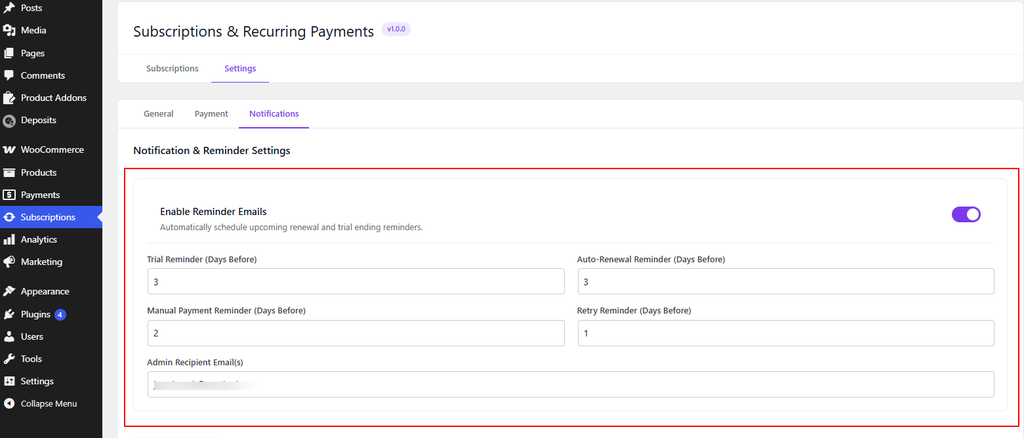
3. Configure the reminder schedules according to your requirements:
Trial Reminder (Days Before) — Specify how many days before the trial ends the customer should receive a reminder.
Example: Enter 3 to send a reminder 3 days before the trial expires.
Auto-Renewal Reminder (Days Before) — Specify how many days before an automatic subscription renewal the customer should receive a reminder.
Example: Enter 3 to send a reminder 3 days before the automatic renewal.
Manual Payment Reminder (Days Before) — Specify how many days before a manual renewal payment the customer should receive a reminder.
Example: Enter 2 to send a reminder 2 days before the payment is due.
Retry Reminder (Days Before) — Specify how many days before a payment retry the customer should receive a reminder.
Example: Enter 1 to send a reminder 1 day before the payment retry.
Admin Recipient Email(s) — Enter the email address where you want to receive copies or alerts related to subscription events, such as failed renewals.
4. Click Save Changes to apply the notification settings.
If you have questions about our plugin(s), are experiencing issues with any of our plugin






















 Login
Login
 Cart
Cart
