Login
Login
 Cart
Cart
WooCommerce dynamic pricing lets you change product prices automatically based on rules you control. You can discount by quantity, cart total, user role, order history, or date without touching each price by hand. This guide covers what dynamic pricing is, how rules work, the 12 most useful discount types, and how to set it all up with Acowebs.
TL;DR: Dynamic pricing means prices that change with demand, quantity, customer, or time. In WooCommerce, you add it with a plugin like Acowebs’ Dynamic Pricing With Discount Rules. You create rules (conditions + actions), and the plugin applies discounts on the product page, cart, or checkout. Common types: quantity, tiered, cart value, percentage, fixed, BOGO, free gift, product, role, order history, payment, and scheduled discounts. Done well, dynamic pricing raises average order value, clears stock, and rewards loyal buyers.
What Is Dynamic Pricing?

Dynamic pricing is a strategy where businesses set flexible prices based on current market demand; prices rise when demand is high and fall when it drops. It is a form of revenue management. Sellers use it to earn more in peak periods, clear slow-moving stock, and stay competitive as demand shifts. It takes several forms, including demand pricing, time-based pricing, and variable pricing.
You already see it daily. Amazon changes prices on the same product many times a day. Ride-hailing apps charge more at rush hour. Hotels and flights cost more in peak season.
In the US, e-commerce keeps growing. The Census Bureau put second-quarter 2026 online sales at $340.2 billion, 17.1% of all retail. More online sales means more price competition, and dynamic pricing is how stores win it.
What Is a Dynamic Pricing Rule?
A dynamic pricing rule has two parts: a condition and an action.
- The condition is the trigger. Examples: “cart total is over $100”, “customer buys 5 or more units”, “the customer is a wholesale buyer”, or “today is Black Friday”.
- The action is the result. Examples: “apply 10% off”, “reduce price by $20”, “give one free item”.
The plugin checks each cart against your rules and applies the discount when a condition matches. Multiple rules can stack, and most plugins let you set usage limits and exclusions.
What Is WooCommerce Dynamic Pricing?
WooCommerce dynamic pricing is dynamic pricing built for WooCommerce stores. WooCommerce itself has no native bulk or role discounts, so stores use plugins. The official WooCommerce marketplace even sells a “Dynamic Pricing for WooCommerce” extension for bulk and role-based discounts.
Acowebs offers WooCommerce Dynamic Pricing With Discount Rules, a plugin with 9,000+ active installs. It supports percentage and fixed discounts across product price, cart total, and quantity, plus BOGO, free gifts, user restrictions, scheduling, and pricing tables.
Examples of Dynamic Pricing for WooCommerce
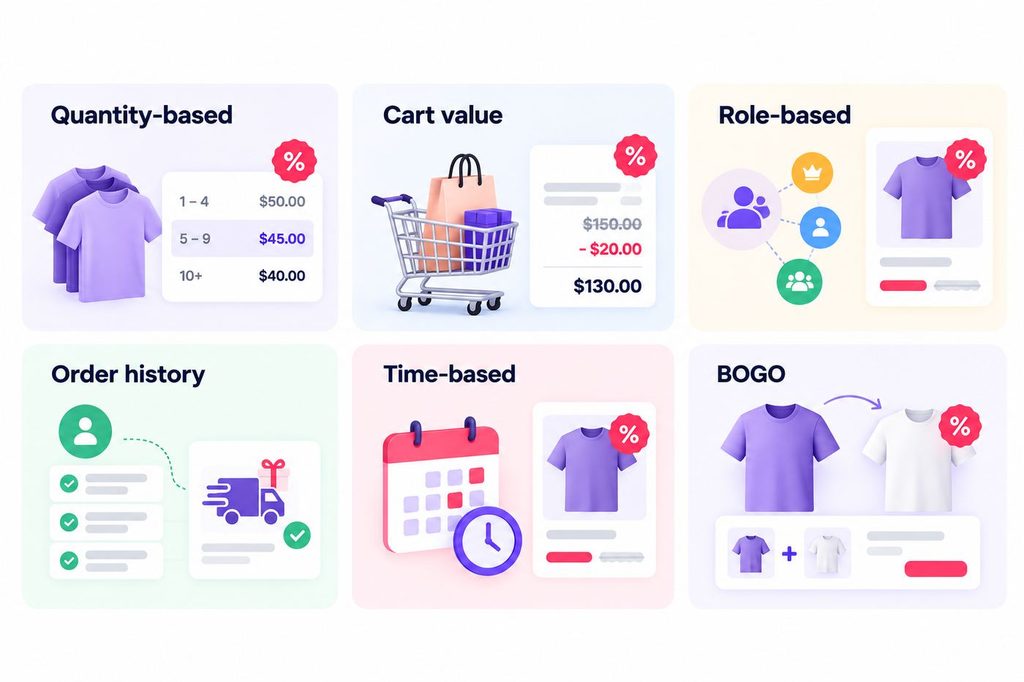
- Quantity-based: Buy 5 units, get 10% off each.
- Cart value: Spend $150, get $20 off the whole cart.
- Role-based: Wholesale customers see a 15% discount on every product.
- Order history: Customers with 3+ past orders get free shipping.
- Time-based: A 25% sale badge appears every weekend or for 48 hours around a holiday.
- BOGO: Buy one T-shirt, get the second at 50% off.
Benefits of Dynamic Pricing
- Higher average order value: Quantity and cart-value discounts push customers to add more. A shopper deciding between one and two units changes their mind when the second unit carries 10% off the rule does the upselling for you.
- Stock control: Scheduled sales move old inventory without permanent markdowns. A rule that discounts a slow-moving line for one week clears the shelf, then switches itself off and the full price returns automatically.
- Customer loyalty: Role and order-history discounts reward your best buyers. Wholesale customers see their own price tier, repeat buyers get a reward based on their number of orders or amount spent, and lapsed customers can be pulled back with a time-limited offer.
- Less manual work: Rules run automatically; you do not edit prices one by one. One rule covers every matching cart, so a catalog of hundreds of products needs a handful of rules instead of hundreds of price edits.
- Seasonal agility: You can price for Black Friday, Halloween, or a flash sale in minutes. Schedule the discount for the event dates and the plugin turns the sale on and off for you no late-night price editing when the promo starts.
- Fairer peak pricing: Raise prices when demand spikes and lower them when it drops, so busy periods earn more without permanently raising your list prices.
One caution: customers dislike finding out someone paid less for the same item. Keep rules simple and visible a published wholesale tier or a clearly dated sale window feels fair, while a hidden per-customer price feels arbitrary. Pair every discount with a clear strikethrough of the original price so the saving is transparent.
How Does WooCommerce Dynamic Pricing Work?
- The store owner creates a rule with a condition and an action. In the plugin, you pick a discount type percentage or fixed amount choose the module (product price, cart total, or quantity), and set the trigger, such as “cart total over $100” or “5 or more units of this product”.
- The plugin evaluates the cart when a shopper views a product, opens the cart, or reaches checkout. It checks the cart against every active rule, including user role, number of orders, amount spent, and any dates or days in the schedule.
- On match, the plugin shows the discounted price where the shopper is looking: a struck-through original price with the new price on the product page for product-based discounts, a pricing table for quantity and range deals, or a discount line in the cart for cart-total discounts.
- Rules then run on their own. They respect usage limits per rule or per role, follow your product and category exclusions, and switch on and off on the schedule you set a weekend sale or holiday promo starts and ends without you touching the site.
The discount appears exactly where the shopper can see the savings on the product page, in a pricing table, or in the cart, which is what makes it convert. The shopper never has to wonder whether a discount applied; the plugin states it in plain numbers.
Types of WooCommerce Dynamic Pricing
Quantity-Based Discount
The price drops when the shopper buys more of one product. Example: 3–5 units = 5% off, 6+ units = 10% off. Great for wholesale-style stores.
Tiered Discount
Tiers are steps that unlock better prices as quantity or spend rises. The plugin shows them as a pricing table, so shoppers see the next tier and add more items to reach it.
Cart Value Discount
A discount triggers when the whole cart crosses a value. Example: spend $100, get $10 off. This lifts basket size instead of pushing a single product.
Percentage Discount
A percent is taken off the price or cart total. Example: 15% off. Easy to understand and easy to promote.
Fixed Amount Discount
A set amount is removed $5 off a product, $20 off the cart. Predictable margins, strong for high-ticket items.
Buy X Get Y (BOGO)
Buy one, get one free or half price. Acowebs supports BOGO rules, including discounts on the cheapest product in the cart and on every nth quantity.
Free Gift Discount
A product is added as a gift when conditions are met first order, a category purchase, or a spend threshold. Gifts feel personal and raise perceived value.
Product-Based Discount
Discounts target a product list or a category, with inclusions and exclusions. You can discount a slow-moving line without touching the rest of the catalog.
User/Role-Based Discount
Prices differ by user role customer, wholesaler, VIP, shop manager. Acowebs lets you restrict rules by role or apply them to individual users.
Order History-Based Discount
The discount depends on past behavior: number of orders, total amount spent, or last order value. Reward repeat buyers and re-engage lapsed ones.
Payment/Shipping-Based Discount
Discounts reward a payment method (pay by bank transfer, get 2% off) or waive shipping over a threshold. These cut your own costs while pleasing customers.
Scheduled/Time-Based Discount
Rules activate on chosen dates or days a weekend sale, a holiday promo, a flash sale. Acowebs schedules discounts and can show sale badges and countdown timers. Combine it with a holiday discount schedule for events like Black Friday.
Dynamic Pricing vs Variable Pricing
Wikipedia lists variable pricing as another name for dynamic pricing, so the terms overlap. In common store use, the difference is the trigger.
| Comparison Factor | Dynamic Pricing | Variable Pricing |
| Core idea | Prices change automatically with demand, time, or cart conditions | Different prices exist for different buyers or product versions |
| What drives it | Rules and market conditions | Customer segments or product differentiation |
| Example | 10% off when cart total passes $100 | Student pricing vs full pricing; base model vs premium model |
| In WooCommerce | Discount rules plugin | Same plugin rules per role or product |
For most WooCommerce stores the practical answer is the same: you set rules, and different shoppers see different prices.
How to Set Up WooCommerce Dynamic Pricing Using Acowebs
The Acowebs Dynamic Pricing plugin runs on WordPress 4.4 or higher, has a free version to start, and has 9,000+ active installs. Setup takes minutes:
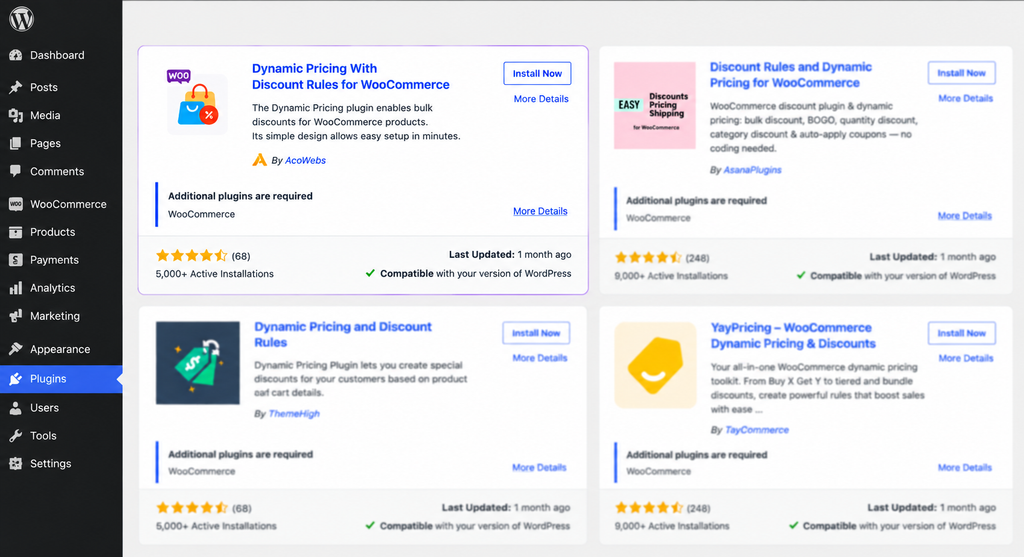
- Install and activate the plugin from your WordPress admin, then open WooCommerce Dynamic Pricing from the menu.
2. Create a rule. Add a new rule and pick a discount type a percentage off or a fixed amount off.
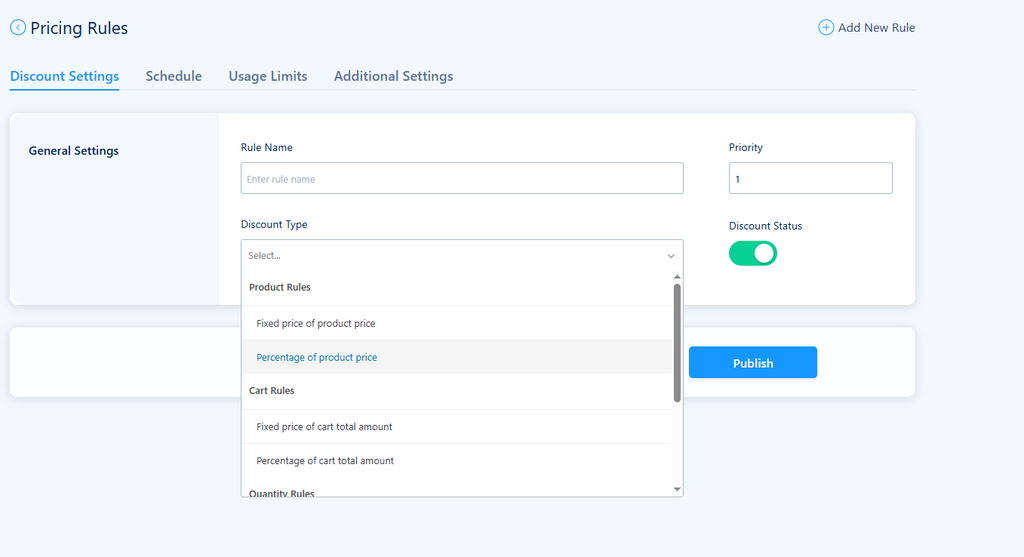
3. Choose the module. Apply the discount to product price, cart total, product quantity, or the number of items in the cart. This decides where the discount shows: on the product page, in the cart, or as a pricing table.
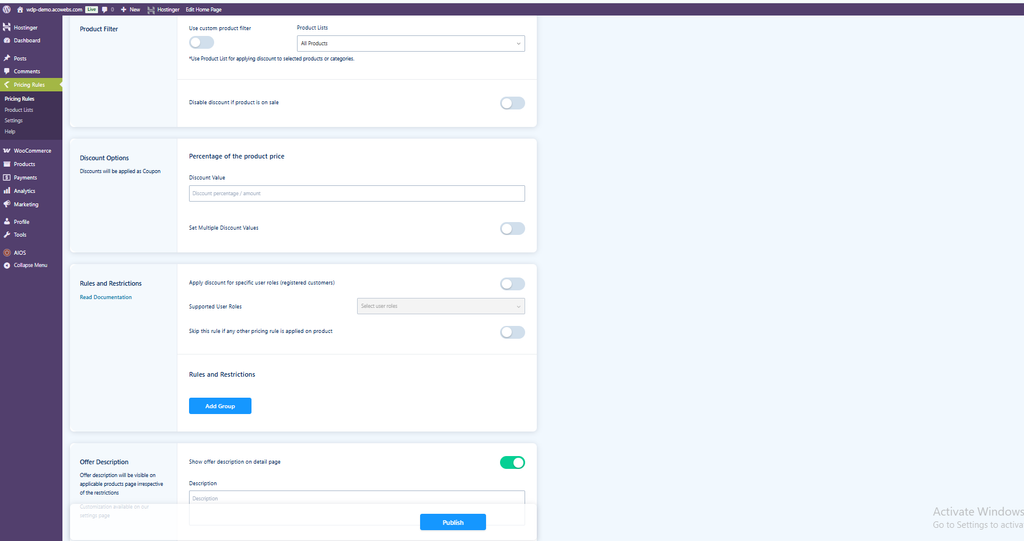
4. Set conditions. Add the trigger quantity ranges, cart values, user roles, number of orders, amount spent, or a schedule of dates and days. You can also restrict a rule to individual users from the user list.
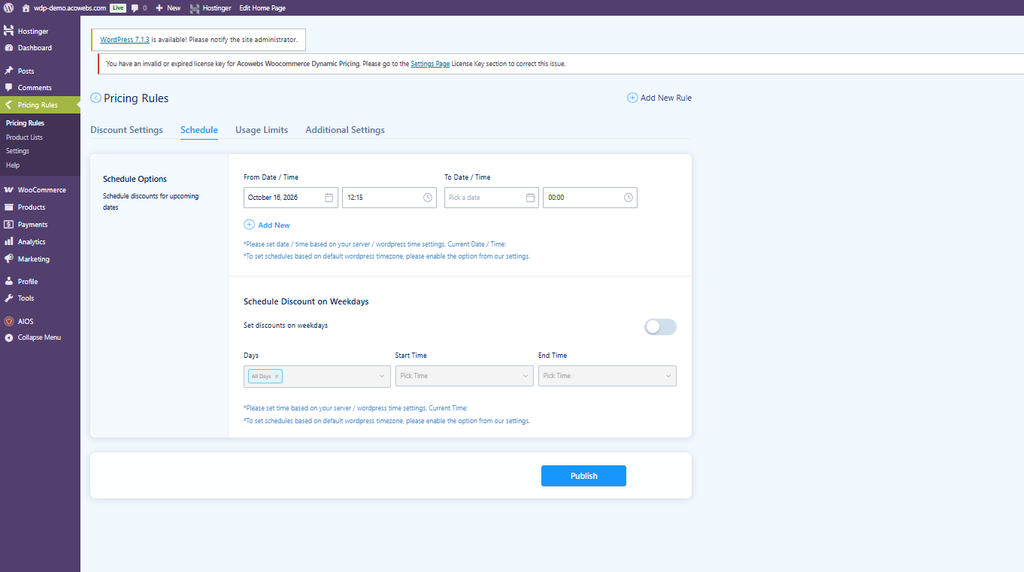
5. Add limits. Set a usage limit for the total number of times a rule can apply, or different limits for different user roles, so one offer cannot be claimed on every order.
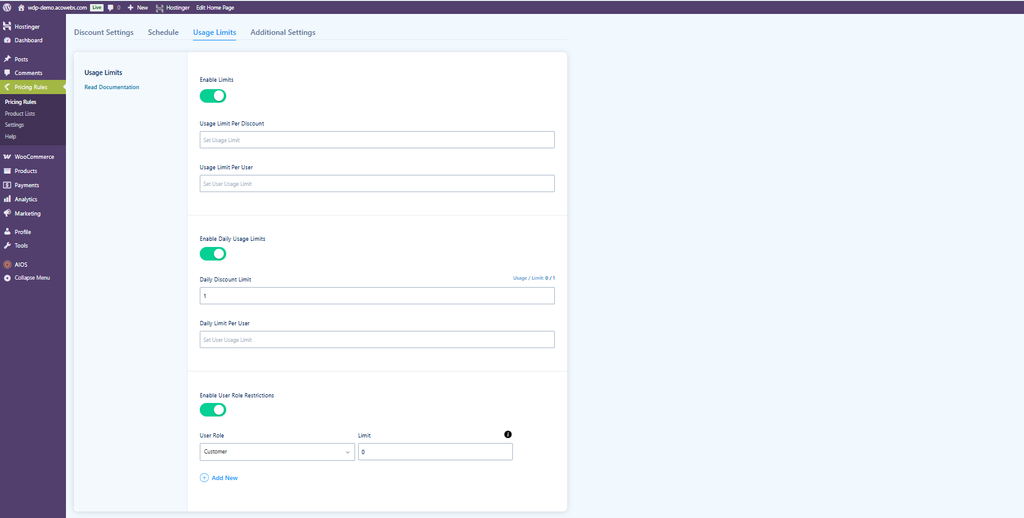
6. Control the catalog. By default a rule covers all products; include or exclude specific products, or pick a category and remove some products from it.
7. Display it. Turn on the pricing table for quantity-based discounts so shoppers see the next tier, and add sale badges or countdown timers for scheduled promos. The original price is struck through automatically and the discounted price shown in its place.
Pricing starts at 49foronesiteforayear(119 for lifetime updates, with a 30-day money-back guarantee. The plugin also supports WPML and Polylang, so multilingual stores run the same rules in every language.
If you want to compare before committing, WooCommerce’s own marketplace lists a Dynamic Pricing extension for bulk and role-based discounts Acowebs covers those plus cart, quantity, BOGO, gift, and scheduled rules in one plugin.
Best Practices for a WooCommerce Pricing Strategy
- Discount what you need to move. Use product-based rules for slow-moving lines, not the whole catalog. A rule that targets one overstocked product clears it without giving away margin on your bestsellers.
- Show the saving. A struck-through original price and a clear badge make discounts feel real. The plugin does this automatically on the product page, so the shopper sees the deal where they decide not for the first time at checkout.
- Test before you launch. Run each rule against a test cart a product-based rule, a cart-total rule, and a role-based rule so conditions never misfire on a live order.
- Set usage limits. Caps stop one rule from being abused on every order. A first-order gift rule with a per-customer limit stays a welcome offer instead of becoming a permanent discount.
- Avoid permanent discounts. Constant sales train customers to wait. See our discount pricing strategies and dynamic pricing strategy guides for the fuller picture.
- Pair with urgency. Scheduled deals, sale badges, and countdown timers lift conversions without heavy discounts a time-boxed sale converts better than an open-ended one at the same percentage.
- Keep margins in view. Fixed-amount rules are predictable; BOGO needs a margin check on the free unit. Work out the cost of the gifted item before you publish the rule.

Make Your Store Halloween-Ready!
Discover special Halloween deals from AcoWebs and save more on WooCommerce solutions this spooky season.
Shop Halloween Deals →Conclusion
WooCommerce dynamic pricing turns fixed price lists into rules that work for you. Quantity, cart value, role, order history, and scheduled discounts all increase average order value and reward loyal customers without editing prices by hand. Acowebs’ WooCommerce Dynamic Pricing With Discount Rules delivers every type in one plugin, from BOGO and free gifts to pricing tables and sale timers. Start with one rule, test it, and let the discounts do the selling.
Acowebs are the developers of Woocommerce Custom Product Addons which is a optimized, lightweight, and fruitful plugin that is simply the best to add extra product options using its custom form builder easily. WooCommerce custom fields also comes with drag and drop form builder, 22+ field types and custom price formula.
FAQs
Yes. WooCommerce has no built-in bulk or role discounts, but plugins add them. The official WooCommerce marketplace sells a Dynamic Pricing extension, and Acowebs offers a rule-based plugin for percentage, fixed, BOGO, role, and scheduled discounts.
Fixed pricing one price for everyone, set in advance and rarely changed. Most small stores start with fixed pricing; dynamic pricing replaces it with rules that vary by demand, quantity, or customer.
Dynamic pricing changes prices with market or cart conditions: quantity, time, demand. Personalized pricing changes prices for an individual based on their data browsing history, past spend, or location. Both use rules, but personalized pricing targets one shopper; dynamic pricing targets a condition.
Because setting your own prices is normal business freedom. Merchants may charge different prices at different times, and shoppers can choose not to buy. It becomes illegal only when it is deceptive or discriminates on legally protected grounds, which is why clear, rule-based discounts stay on the right side of consumer-protection law.